What you’re actually writing when you write a SKILL.md
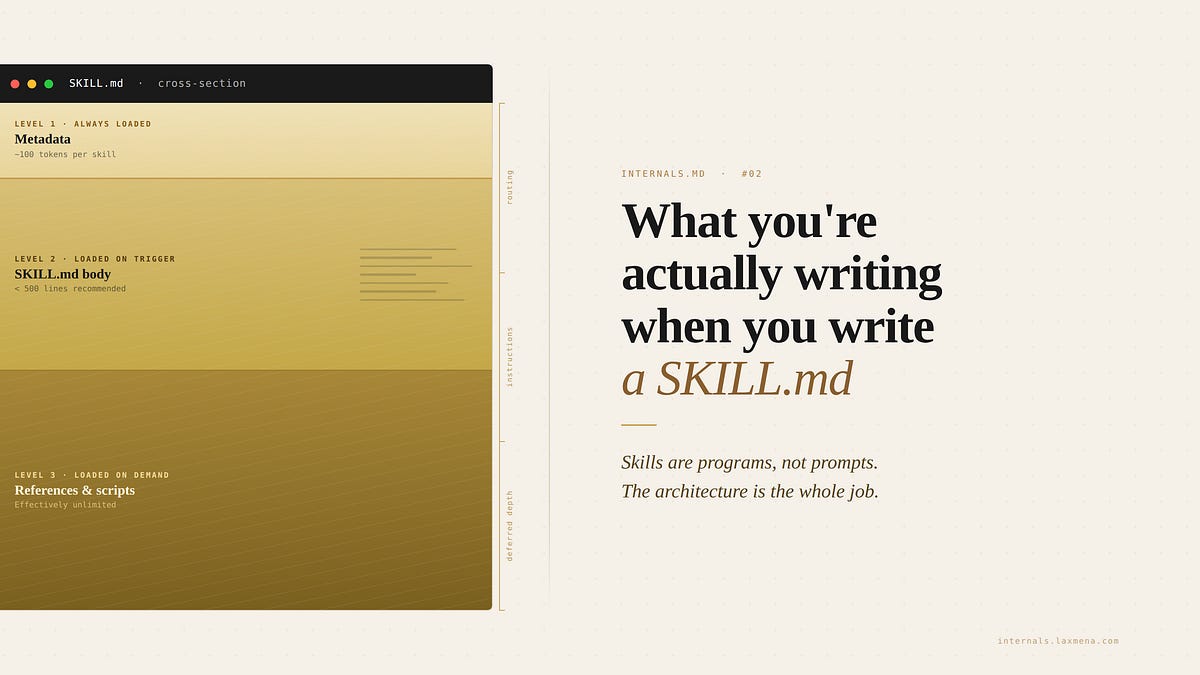
Skills for AI agents are loader specifications, not merely long prompts, operating on a principle of progressive disclosure with three distinct loading levels to manage context window cost. Understanding this architecture is crucial, as content placement directly impacts efficiency and prevents common antipatterns like monolithic skills or mismanaged metadata. Proper skill design optimizes context usage, improves portability, and ensures consistent performance, especially when dealing with envir
Key Actionable Guidance (produce in NotebookLM)
To build effective skills without wasting context or causing silent failures, the author recommends the following:
Structure for Progressive Disclosure: Organize your skill into three distinct levels based on when the agent needs them.
Level 1 (Metadata): Use YAML frontmatter strictly for the name and description. This is always loaded and tells the agent when to trigger the skill.
Level 2 (SKILL.md body): Keep this to core procedural instructions (ideally under 500 lines) that load only when the skill is invoked.
Level 3 (References and Scripts): Put large maps, long examples, or executable code in separate files that the main skill can point to. These are loaded purely on demand.
Remove Frontmatter from Reference Files: Never put YAML metadata on your reference files. Doing so pushes them into the always-loaded memory, cluttering the routing system and causing the agent to trigger sub-instructions without their parent context.
Break Up Monolithic Files: Do not dump all your instructions into a single SKILL.md. Moving granular details into reference files can drastically cut down how much context the skill consumes on every turn (in the author's case, dropping usage from 20% to 7%).
Make File Paths Discoverable: Do not hardcode specific directories (like modules/web), because the skill will break when shared with teammates who use different repository structures. Instead, instruct the agent to actively discover the correct paths (e.g., by searching for a package.json file).
Maintain a "Gotchas" Section: AI agents operate on reasonable default assumptions that might not match your specific setup. Explicitly document your environment's unique quirks—such as needing to run a build command from the root directory—in a single, heavily maintained "Gotchas" section so the agent doesn't make incorrect assumptions.
Test with a "Golden Set" of Evals: Never assume that upgrading to a smarter AI model will yield better results; more capable models often interpret instructions differently rather than following them literally. Maintain a small suite of realistic test prompts (evals) to measure output quality every time you edit the skill or upgrade the underlying model.
Updated May 4, 2026
From the source
What you're actually writing when you write a SKILL.md INTERNALS.md Subscribe Sign in What you're actually writing when you write a SKILL.md INTERNALS.md #2 · Skills are programs, not prompts. How the skills runtime actually loads, and why the architecture is everything. Lax Meiyappan Apr 30, 2026 16 4 3 Share A skill is a small program. It has three execution stages: 1\ what loads every turn, 2\ what loads on invocation, and 3\ what loads on demand. Because a skill is a program, it suffers from typical software rot—environment drift, version sensitivity, and silent, non-reproducible failures. You’ll see these failures in specific shapes.